
Objective
We will learn how to create a simple Web application with Struts 2 framework with Eclipse. The Web application has two JSP pages:
– index.jsp: this page contains an introduction phrase and a link to the second page
– helloworld.jsp: this page will be appeared when an user click on the link on the first page. It displays a welcome phrase to Struts 2!
Web application creation with Eclipse
– Step 1: start the Eclipse J2EE environment, click on New project -> Dynamic Web project

– Step 2: type the project name as struts2-helloworld, then click Finish

– Step 3: Create the folders in the project directory as follow:
– in the src folder, create two packages: control and model. In package
control, create a java class of name HelloWorldAction. In package model,
create a java class of name MessageStore.
– in the WebContent folder, create two JSP pages: HelloWorld and index.
– in the WebContent/WEB-INF/ folder, create a file web.xml
– in the WebContent/WEB-INF/classes folder, create a file struts.xml

– Step 4: download all Struts 2 libraries from Apache server (http://mirrors.digipower.vn/apache//struts/library/struts-2.3.15.2-lib.zip), and then put all of them in the WebContent/WEB-INF/lib folder:

– Step 5: define all java classes, JSP pages, and .xml file we created in step 3:
MessageStore.java
package model;
public class MessageStore {
    private String message;
    public MessageStore() {
        setMessage("Hello everybody learning Struts 2!");
    }
    public String getMessage() {
        return message;
    }
    public void setMessage(String message) {
        this.message = message;
    }
}
HelloWorldAction.java
package control;
import model.MessageStore;
import com.opensymphony.xwork2.ActionSupport;
public class HelloWorldAction extends ActionSupport {
    private static final long serialVersionUID = 1L;
    private MessageStore messageStore;
    public String execute() throws Exception {
        messageStore = new MessageStore() ;
        return SUCCESS;
    }
    public MessageStore getMessageStore() {
        return messageStore;
    }
    public void setMessageStore(MessageStore messageStore) {
        this.messageStore = messageStore;
    }
}
index.jsp
 <%@ page language="java" contentType="text/html; charset=ISO-8859-1"
    pageEncoding="ISO-8859-1"%>
<%@ taglib prefix="s" uri="/struts-tags" %>
<!DOCTYPE html PUBLIC "-//W3C//DTD HTML 4.01 Transitional//EN" "http://www.w3.org/TR/html4/loose.dtd">
<html>
<head>
<meta http-equiv="Content-Type" content="text/html; charset=ISO-8859-1">
<title>Basic Struts 2 Application - Welcome</title>
</head>
<body>
<h1>Welcome To Struts 2!</h1>
<p><a href="<s:url action='hello'/>">Hello World</a></p>
</body>
</html>
HelloWorld.jsp
 <%@ page language="java" contentType="text/html; charset=ISO-8859-1"
    pageEncoding="ISO-8859-1"%>
<%@ taglib prefix="s" uri="/struts-tags" %>
<!DOCTYPE html PUBLIC "-//W3C//DTD HTML 4.01 Transitional//EN" "http://www.w3.org/TR/html4/loose.dtd">
<html>
<head>
<meta http-equiv="Content-Type" content="text/html; charset=ISO-8859-1">
<title>Hello World!</title>
</head>
<body>
    <h2><s:property value="messageStore.message" /></h2>
</body>
</html>
web.xml
 <?xml version="1.0" encoding="UTF-8"?>
<web-app  id="WebApp_9" version="2.4" xmlns="http://java.sun.com/xml/ns/j2ee"  xmlns:xsi="http://www.w3.org/2001/XMLSchema-instance"  xsi:schemaLocation="http://java.sun.com/xml/ns/j2ee  http://java.sun.com/xml/ns/j2ee/web-app_2_4.xsd">
    <display-name>Struts Blank</display-name>
    <filter>
        <filter-name>struts2</filter-name>
        <filter-class>org.apache.struts2.dispatcher.ng.filter.StrutsPrepareAndExecuteFilter</filter-class>
    </filter>
    <filter-mapping>
        <filter-name>struts2</filter-name>
        <url-pattern>/*</url-pattern>
    </filter-mapping>
    <welcome-file-list>
        <welcome-file>index.jsp</welcome-file>
    </welcome-file-list>
</web-app>
struts.xml
 <?xml version="1.0" encoding="UTF-8"?>
<!DOCTYPE struts PUBLIC
    "-//Apache Software Foundation//DTD Struts Configuration 2.0//EN"
    "http://struts.apache.org/dtds/struts-2.0.dtd">
<struts>
  <constant name="struts.devMode" value="true" />
  <package name="basicstruts2" extends="struts-default">
  <action name="index">
    <result>/index.jsp</result>
  </action>
  <action name="hello" class="control.HelloWorldAction" method="execute">
    <result name="success">/HelloWorld.jsp</result>
  </action>
</package>
</struts>
Results
– starts the Tomcat server which is integrated into Eclipse,
– start a Web browser, type: hocalhost:8080/struts2-helloworld into URL bar, the index page is:
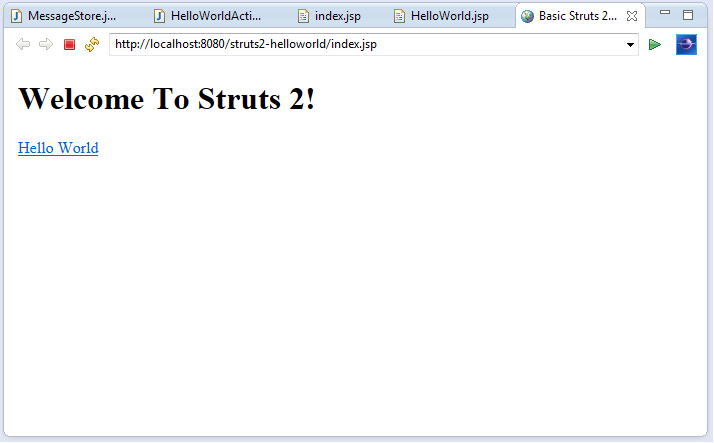
– click on the link labeled as “Hello World”, the hello world page will appeared:

 Software: Art of Design and Programming