
Objective
MVC is known as Model-View-Control model. In which, Model represents entity or bean classes, View represents interface classes, and Control represents business and/or processing classes.
Our objective is to construct a login application in respecting the MVC model. Assumption that we have a table named “tblUser” in a database “loginManagement” which is managed by a DBMS of MySQL.
Project
There are three classes needed:
– LoginModel.java
– LoginView.java
– LoginControl.java
The relation among three classes is depicted as:

Now, start your Eclipse and create a new Java Application with the packages as follows:
LoginModel.java
public class LoginModel {
    private String userName;
    private String password;

    public LoginModel(){

    }

    public LoginModel(String username, String password){
        this.userName = username;
        this.password = password;
    }
    public String getPassword() {
        return password;
    }
    public void setPassword(String password) {
        this.password = password;
    }
    public String getUserName() {
        return userName;
    }
    public void setUserName(String userName) {
        this.userName = userName;
    }
}
LoginView.java
Note that this class does not process the Login button clicked event. It forwards this event to Control class by the method: “addLoginListenner()”
import java.awt.FlowLayout;
import java.awt.event.ActionEvent;
import java.awt.event.ActionListener;
import java.awt.event.WindowAdapter;
import java.awt.event.WindowEvent;
import javax.swing.JButton;
import javax.swing.JFrame;
import javax.swing.JLabel;
import javax.swing.JOptionPane;
import javax.swing.JPanel;
import javax.swing.JPasswordField;
import javax.swing.JTextField;
public class LoginView extends JFrame implements ActionListener{
    private JTextField txtUsername;
    private JPasswordField txtPassword;
    private JButton btnLogin;
    private LoginModel model;

    public LoginView(){
        super("Login MVC");

        txtUsername = new JTextField(15);
        txtPassword = new JPasswordField(15);
        txtPassword.setEchoChar('*');
        btnLogin = new JButton("Login");

        JPanel content = new JPanel();
        content.setLayout(new FlowLayout());
        content.add(new JLabel("Username:"));
        content.add(txtUsername);
        content.add(new JLabel("Password:"));
        content.add(txtPassword);
        content.add(btnLogin);

        btnLogin.addActionListener(this);

        this.setContentPane(content);
        this.pack();

        this.addWindowListener(new WindowAdapter(){
            public void windowClosing(WindowEvent e){
                System.exit(0);
            }
        });
    }
    public void actionPerformed(ActionEvent e) {
    }

    public LoginModel getUser(){
        model = new LoginModel(txtUsername.getText(), txtPassword.getText());
        return model;
    }

    public void showMessage(String msg){
        JOptionPane.showMessageDialog(this, msg);
    }

    public void addLoginListener(ActionListener log) {
          btnLogin.addActionListener(log);
        }
}
LoginControl.java
The Login button clicked event is really processed in the inner class LoginListenner of this control class.
import java.awt.event.ActionEvent;
import java.awt.event.ActionListener;
import java.sql.Connection;
import java.sql.DriverManager;
import java.sql.ResultSet;
import java.sql.Statement;
public class LoginControl {
    private LoginModel model;
    private LoginView view;

    public LoginControl(LoginView view){
        this.view = view;

        view.addLoginListener(new LoginListener());
    }

    class LoginListener implements ActionListener {
        public void actionPerformed(ActionEvent e) {
            try {
                model = view.getUser();
                if(checkUser(model)){
                    view.showMessage("Login succesfully!");
                }else{
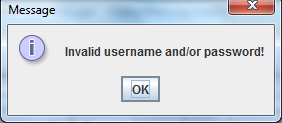
                    view.showMessage("Invalid username and/or password!");
                }
            } catch (Exception ex) {
                view.showMessage(ex.getStackTrace().toString());
            }
        }
    }

    public boolean checkUser(LoginModel user) throws Exception {

        String dbUrl = "jdbc:mysql://your.database.domain/LoginManagement";
        String dbClass = "com.mysql.jdbc.Driver";
        String query = "Select * FROM users WHERE username ='" + user.getUserName()
                + "' AND password ='" + user.getPassword() + "'";
        try {
            Class.forName(dbClass);
            Connection con = DriverManager.getConnection (dbUrl);
            Statement stmt = con.createStatement();
            ResultSet rs = stmt.executeQuery(query);
            if (rs.next()) {
              return true;
            }
            con.close();
        }catch(Exception e) {
            throw e;
        }
        return false;
      }
}
Test.java
public class Test {
     public static void main(String[] args) {
         LoginView view       = new LoginView();
         LoginControl controller = new LoginControl(view);
         view.setVisible(true);
     }
}
Results
Login interface:

Login success interface:

Login failed interface:
 Software: Art of Design and Programming
program is working and simple to follow
LikeLike