
Objective
In this tutorial, we will study how to create a simple web service at the server side and then, create a web service client which invokes the remote service from the server:
- At the server side, a simple service of calculator with four operators: sum (+), minus (-), multiple (*), and divide (/) is created as a web project in Eclipse. And then, it is configurated as a web service
- At the client side, a simple console application is created to call the remote web service by using the generated classes from WSDL file of the web service. These classes are the same those that are generated from the -wsimport tool.
Create web project at the server side
- Open Eclipse J2EE, create a dynamic web project named wsCalculator
- In the /src folder, create a class Calculator in a package webservices
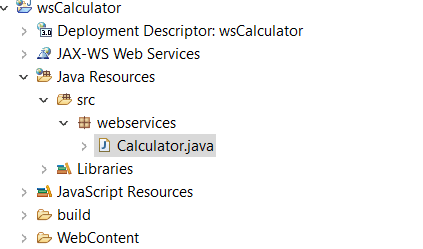
The complete code of the class Calculator is follow:
package webservices;

public class Calculator {

	public float sum(float a, float b){
		return (a+b);
	}

	public float minus(float a, float b){
		return (a-b);
	}

	public float multiple(float a, float b){
		return (a*b);
	}

	public float division(float a, float b){
		if (b!= 0) return (a/b);
		return 0;
	}
}
Create web service
- In Eclipse, click new -> select: Web service, a sub wizard appears as follow.
- Browse the Calculator class from the web project that is created above.
- Select the options of server side and client side as follow
- Click finish
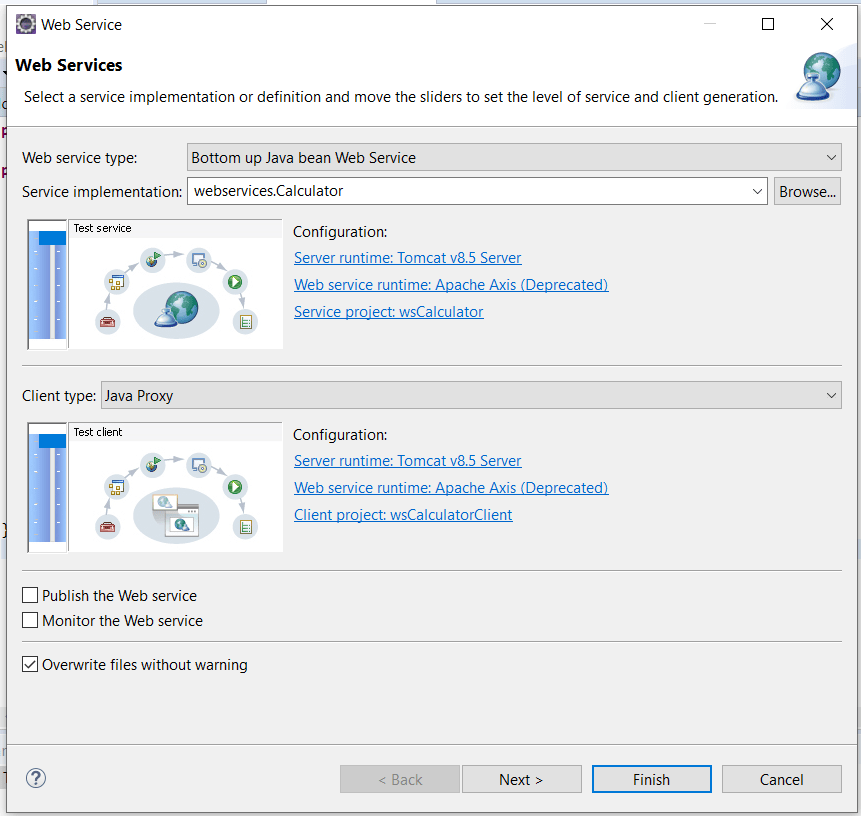
- The wsdl file is generated and save in the folder of: webcontent/wsdl/Calculator.wsdl
<?xml version="1.0" encoding="UTF-8"?>
<wsdl:definitions targetNamespace="http://webservices" xmlns:apachesoap="http://xml.apache.org/xml-soap" xmlns:impl="http://webservices" xmlns:intf="http://webservices" xmlns:wsdl="http://schemas.xmlsoap.org/wsdl/" xmlns:wsdlsoap="http://schemas.xmlsoap.org/wsdl/soap/" xmlns:xsd="http://www.w3.org/2001/XMLSchema">
<!--WSDL created by Apache Axis version: 1.4
Built on Apr 22, 2006 (06:55:48 PDT)-->
 <wsdl:types>
  <schema elementFormDefault="qualified" targetNamespace="http://webservices" xmlns="http://www.w3.org/2001/XMLSchema">
   <element name="sum">
    <complexType>
     <sequence>
      <element name="a" type="xsd:float"/>
      <element name="b" type="xsd:float"/>
     </sequence>
    </complexType>
   </element>
   <element name="sumResponse">
    <complexType>
     <sequence>
      <element name="sumReturn" type="xsd:float"/>
     </sequence>
    </complexType>
   </element>
   <element name="minus">
    <complexType>
     <sequence>
      <element name="a" type="xsd:float"/>
      <element name="b" type="xsd:float"/>
     </sequence>
    </complexType>
   </element>
   <element name="minusResponse">
    <complexType>
     <sequence>
      <element name="minusReturn" type="xsd:float"/>
     </sequence>
    </complexType>
   </element>
   <element name="multiple">
    <complexType>
     <sequence>
      <element name="a" type="xsd:float"/>
      <element name="b" type="xsd:float"/>
     </sequence>
    </complexType>
   </element>
   <element name="multipleResponse">
    <complexType>
     <sequence>
      <element name="multipleReturn" type="xsd:float"/>
     </sequence>
    </complexType>
   </element>
   <element name="division">
    <complexType>
     <sequence>
      <element name="a" type="xsd:float"/>
      <element name="b" type="xsd:float"/>
     </sequence>
    </complexType>
   </element>
   <element name="divisionResponse">
    <complexType>
     <sequence>
      <element name="divisionReturn" type="xsd:float"/>
     </sequence>
    </complexType>
   </element>
  </schema>
 </wsdl:types>

   <wsdl:message name="sumResponse">

      <wsdl:part element="impl:sumResponse" name="parameters">

      </wsdl:part>

   </wsdl:message>

   <wsdl:message name="divisionRequest">

      <wsdl:part element="impl:division" name="parameters">

      </wsdl:part>

   </wsdl:message>

   <wsdl:message name="minusResponse">

      <wsdl:part element="impl:minusResponse" name="parameters">

      </wsdl:part>

   </wsdl:message>

   <wsdl:message name="multipleResponse">

      <wsdl:part element="impl:multipleResponse" name="parameters">

      </wsdl:part>

   </wsdl:message>

   <wsdl:message name="minusRequest">

      <wsdl:part element="impl:minus" name="parameters">

      </wsdl:part>

   </wsdl:message>

   <wsdl:message name="sumRequest">

      <wsdl:part element="impl:sum" name="parameters">

      </wsdl:part>

   </wsdl:message>

   <wsdl:message name="multipleRequest">

      <wsdl:part element="impl:multiple" name="parameters">

      </wsdl:part>

   </wsdl:message>

   <wsdl:message name="divisionResponse">

      <wsdl:part element="impl:divisionResponse" name="parameters">

      </wsdl:part>

   </wsdl:message>

   <wsdl:portType name="Calculator">

      <wsdl:operation name="sum">

         <wsdl:input message="impl:sumRequest" name="sumRequest">

       </wsdl:input>

         <wsdl:output message="impl:sumResponse" name="sumResponse">

       </wsdl:output>

      </wsdl:operation>

      <wsdl:operation name="minus">

         <wsdl:input message="impl:minusRequest" name="minusRequest">

       </wsdl:input>

         <wsdl:output message="impl:minusResponse" name="minusResponse">

       </wsdl:output>

      </wsdl:operation>

      <wsdl:operation name="multiple">

         <wsdl:input message="impl:multipleRequest" name="multipleRequest">

       </wsdl:input>

         <wsdl:output message="impl:multipleResponse" name="multipleResponse">

       </wsdl:output>

      </wsdl:operation>

      <wsdl:operation name="division">

         <wsdl:input message="impl:divisionRequest" name="divisionRequest">

       </wsdl:input>

         <wsdl:output message="impl:divisionResponse" name="divisionResponse">

       </wsdl:output>

      </wsdl:operation>

   </wsdl:portType>

   <wsdl:binding name="CalculatorSoapBinding" type="impl:Calculator">

      <wsdlsoap:binding style="document" transport="http://schemas.xmlsoap.org/soap/http"/>

      <wsdl:operation name="sum">

         <wsdlsoap:operation soapAction=""/>

         <wsdl:input name="sumRequest">

            <wsdlsoap:body use="literal"/>

         </wsdl:input>

         <wsdl:output name="sumResponse">

            <wsdlsoap:body use="literal"/>

         </wsdl:output>

      </wsdl:operation>

      <wsdl:operation name="minus">

         <wsdlsoap:operation soapAction=""/>

         <wsdl:input name="minusRequest">

            <wsdlsoap:body use="literal"/>

         </wsdl:input>

         <wsdl:output name="minusResponse">

            <wsdlsoap:body use="literal"/>

         </wsdl:output>

      </wsdl:operation>

      <wsdl:operation name="multiple">

         <wsdlsoap:operation soapAction=""/>

         <wsdl:input name="multipleRequest">

            <wsdlsoap:body use="literal"/>

         </wsdl:input>

         <wsdl:output name="multipleResponse">

            <wsdlsoap:body use="literal"/>

         </wsdl:output>

      </wsdl:operation>

      <wsdl:operation name="division">

         <wsdlsoap:operation soapAction=""/>

         <wsdl:input name="divisionRequest">

            <wsdlsoap:body use="literal"/>

         </wsdl:input>

         <wsdl:output name="divisionResponse">

            <wsdlsoap:body use="literal"/>

         </wsdl:output>

      </wsdl:operation>

   </wsdl:binding>

   <wsdl:service name="CalculatorService">

      <wsdl:port binding="impl:CalculatorSoapBinding" name="Calculator">

         <wsdlsoap:address location="http://localhost:8080/wsCalculator/services/Calculator"/>

      </wsdl:port>

   </wsdl:service>

</wsdl:definitions>
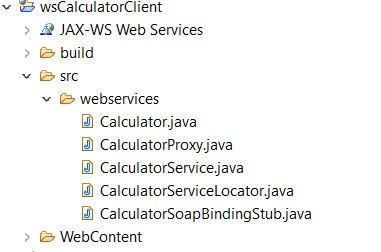
- Eclipse will also generate a client web application for the web service as follow:
- Please pay your attention in the /src/webservices folder, that contains all generated classes as those generated from the tool: -wsimport <wsdl file>
Create standalone client application
- In Eclipse, create new java project named wsClientTuto
- Copy the webservices folder from wsCaculatorClient generated above and paste into the /src folder of the wsClientTuto (please do not mind the control package, that is for the second tutorial in the next study)
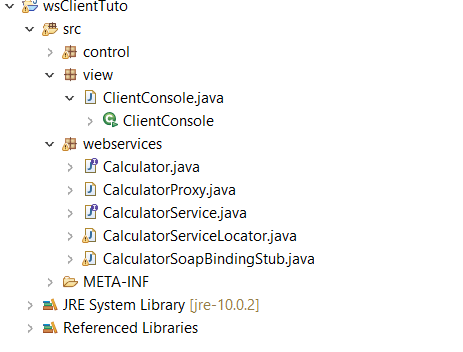
- In the same /src folder, create a view package
- Create a class of ClientConsole.java in the view package, with the content:
package view;

import webservices.Calculator;
import webservices.CalculatorProxy;

public class ClientConsole {

	public static void main(String[] args) {
		try {
			Calculator service = new CalculatorProxy();
			System.out.println("Minus: " + service.minus(10, 2));
			System.out.println("Sum: " + service.sum(10, 2));
			System.out.println("Multiple: " + service.multiple(10, 2));
			System.out.println("Divide: " + service.division(10, 2));
		}catch(Exception e) {
			e.printStackTrace();
		}
	}
}
- Now, thus run the file ClientConsole as a Java application and see the results.
- Do not forget to starts the server (integrated Tomcat) in the Eclipse to serve the web service.
 Software: Art of Design and Programming