
Objective
We will create a Web application of login based on Struts 2 framework in Eclipse:
– a login page enabling to enter username/password, a submit button
– when the submit button is clicked, the server receives the username/password and verifies it from the DB on the server.
– if the login is success, a success page will appear
– otherwise, a failure page is displayed.
Project development
Create a project (to see how to create a Web project and download Struts 2 library, please see: Helloworld) with folders and files in the project directory as follow:
– in the src folder, create two packages: control and model. In package control, create two java classes of name LoginAction and UserDAO. In package model, create a java class of name User.
– add a resource folder into project directory and create a file: ApplicationResources.properties
– in the WebContent folder, create two JSP pages: login and success.
– in the WebContent/WEB-INF/ folder, create a file web.xml
– in the WebContent/WEB-INF/classes folder, create a file struts.xml

Now we have to define all java classes, jsp pages, .property file, and .xml files
User.java
package model;
import java.io.Serializable;
public class User implements Serializable{
    private static final long serialVersionUID = 1L;
    private String username;
    private String password;
    public User(){
    }
    public String getUsername() {
        return username;
    }
    public void setUsername(String username) {
        this.username = username;
    }
    public String getPassword() {
        return password;
    }
    public void setPassword(String password) {
        this.password = password;
    }
}
UserDAO.java
package control;
import java.sql.Connection;
import java.sql.DriverManager;
import java.sql.PreparedStatement;
import java.sql.ResultSet;
import java.sql.SQLException;
import java.sql.Statement;
import model.User;
public class UserDAO {
    private Connection con = null;
    private Statement st = null;
    private ResultSet rs = null;
    private String url = "jdbc:mysql://localhost:3306/hotelmanagement";
    private String user = "root";
    private String password = "12345678";

    public UserDAO(){
        try {
            Class.forName("com.mysql.jdbc.Driver");
            con = DriverManager.getConnection(url, user, password);
            st = con.createStatement();
            rs = st.executeQuery("SELECT VERSION()");
            if (rs.next()) {
                System.out.println(rs.getString(1));
            }
        } catch (Exception ex) {
            ex.printStackTrace();
        }
    }

    public boolean checkLogin(User user){
        boolean result = false;
        try {
            st = con.createStatement();
            String sql= "SELECT * FROM tbluser WHERE username = ? AND password = ?";
            PreparedStatement prs = con.prepareStatement(sql);
            prs.setString(1, user.getUsername());
            prs.setString(2, user.getPassword());

            rs = prs.executeQuery();
            if (rs.next()) {
                result = true;
            }
        } catch (SQLException ex) {
            ex.printStackTrace();
        }
        return result;
    }
}
LoginAction.java
package control;
import model.User;
import com.opensymphony.xwork2.ActionSupport;
public class LoginAction extends ActionSupport{
    private static final long serialVersionUID = 2L;
    private User userBean;

    public String execute() throws Exception {
        UserDAO ud = new UserDAO();
        if (ud.checkLogin(userBean)) {
            return "success";
        } else {
            addActionError(getText("error.login"));
            return "input";
        }
    }

    public void validate(){
        //The addFieldError method takes two arguments.
        //The first is the form field name to which the error applies
        //and the second is the error message to display above that form field.
        if ( userBean.getUsername().length() == 0 ){
            addFieldError( "userBean.username", "Username is required." );
        }

        if ( userBean.getPassword().length() == 0 ){
            addFieldError( "userBean.password", "Password is required." );
        }
    }
    public User getUserBean() {
        return userBean;
    }
    public void setUserBean(User userBean) {
        this.userBean = userBean;
    }
}
ApplicationResources.properties
label.username= Username
label.password= Password
label.login= Login
error.login = Username and password incorrect! Try again...
login.jsp
 <%@ page language="java" contentType="text/html; charset=UTF-8"%>
<%@ taglib prefix="s" uri="/struts-tags"%>
<html>
<head>
<title>Struts 2 - Login Application</title>
</head>
<body>
<h2>Struts 2 - Login Application</h2>
<s:actionerror />
<s:form action="login" method="post">
    <s:textfield name="userBean.username" key="label.username" size="20" />
    <s:password name="userBean.password" key="label.password" size="20" />
    <s:submit method="execute" key="label.login" align="center" />
</s:form>
</body>
</html>
success.jsp
 <%@ page contentType="text/html; charset=UTF-8"%>
<%@ taglib prefix="s" uri="/struts-tags"%>
<html>
<head>
<title>Welcome</title>
</head>
<body>
    <h2>Hi, <s:property value="userBean.username" />!</h2>
</body>
</html>
web.xml
  <?xml version="1.0" encoding="UTF-8"?>
<web-app  id="WebApp_9" version="2.4" xmlns="http://java.sun.com/xml/ns/j2ee"  xmlns:xsi="http://www.w3.org/2001/XMLSchema-instance"  xsi:schemaLocation="http://java.sun.com/xml/ns/j2ee  http://java.sun.com/xml/ns/j2ee/web-app_2_4.xsd">
    <display-name>Struts Blank</display-name>
    <filter>
        <filter-name>struts2</filter-name>
        <filter-class>org.apache.struts2.dispatcher.ng.filter.StrutsPrepareAndExecuteFilter</filter-class>
    </filter>
    <filter-mapping>
        <filter-name>struts2</filter-name>
        <url-pattern>/*</url-pattern>
    </filter-mapping>
    <welcome-file-list>
        <welcome-file>login.jsp</welcome-file>
    </welcome-file-list>
</web-app>
struts.xml
 <?xml version="1.0" encoding="UTF-8"?>
<!DOCTYPE struts PUBLIC
    "-//Apache Software Foundation//DTD Struts Configuration 2.0//EN"
    "http://struts.apache.org/dtds/struts-2.0.dtd">
<struts>
  <constant name="struts.devMode" value="true" />
  <constant name="struts.custom.i18n.resources" value="ApplicationResources" />
  <package name="basicstruts2" extends="struts-default">
  <action name="index">
    <result>/login.jsp</result>
  </action>
  <action name="login" class="control.LoginAction" method="execute">
    <result name="success">/success.jsp</result>
    <result name="input">/login.jsp</result>
  </action>
</package>
</struts>
Results
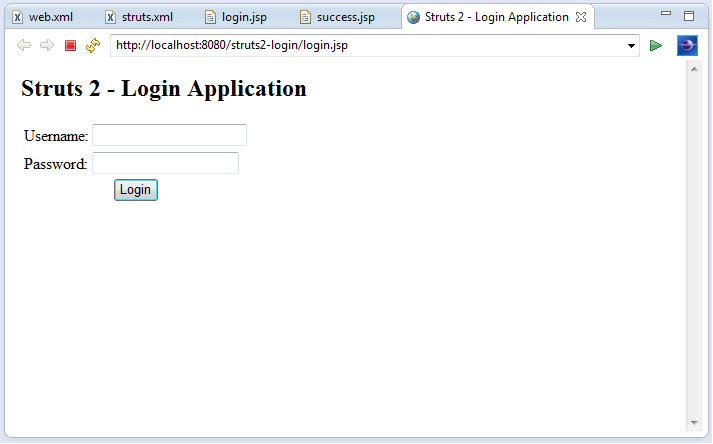
– login page:
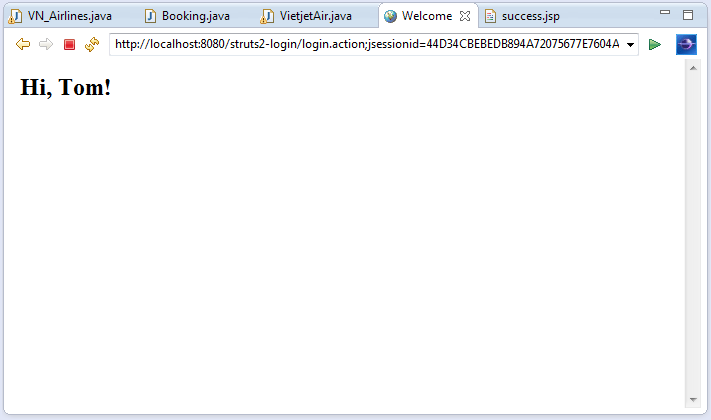
– success page:
 Software: Art of Design and Programming
So excactly, the framework Struts2 use for Client side
LikeLike